
Get Started with NodeLoc in Three Steps
Quickly complete registration, join discussions, and learn the community’s core features.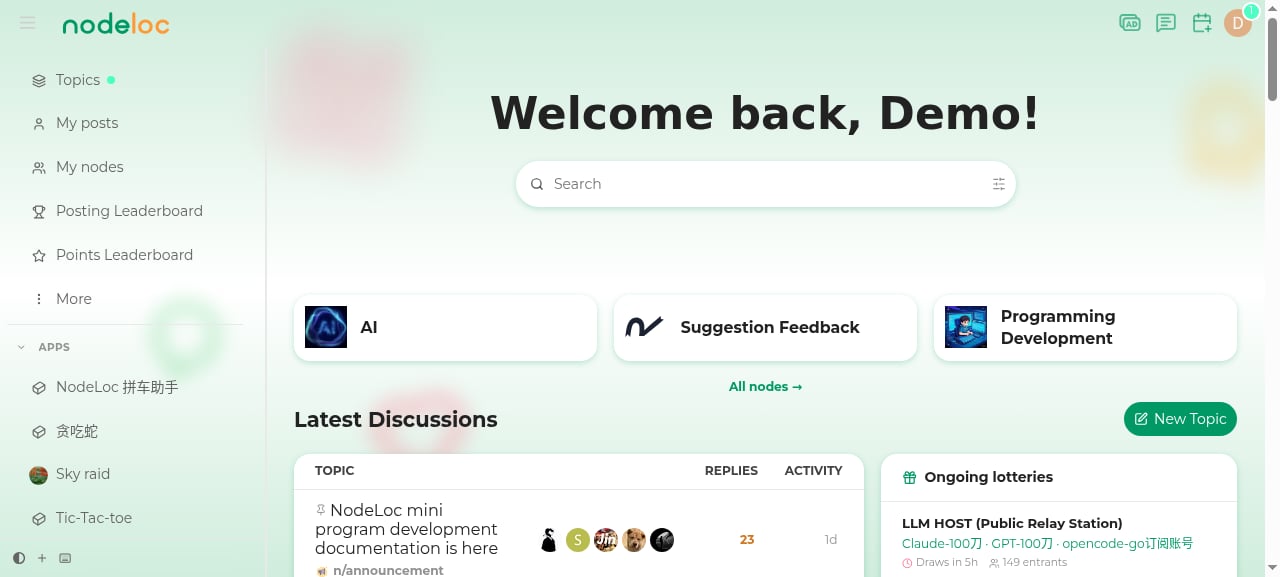
Step 1: Sign Up and Log In
Create an account
Create an account
- Open the NodeLoc homepage.
- Click the “Sign Up” button in the top-right corner.
- Enter a username, email, and password to complete registration.
Log in to the forum
Log in to the forum
- Click the “Log In” button in the top-right corner.
- Enter the email/username and password you registered with.
- Once logged in, you can set your avatar and signature in Preferences.
Step 2: Join the Community
Post and reply
Post and reply
- On the homepage, pick a node (section) that interests you and click “New Topic” to create a post.
- Read other users’ posts and click “Reply” to join the discussion.
- Use the editor toolbar to add images, videos, emoji, and formatted text.
- See Posting & Replying for details.
Daily check-in for Energy
Daily check-in for Energy
- After logging in, there’s a “Daily Check-in” button in the top-right corner of the page.
- Click it once a day to claim an Energy reward.
- See Daily Check-in for details.
Energy and trust levels
Energy and trust levels
- You earn Energy by posting, replying, receiving likes, and more.
- As your activity grows, your trust level increases, unlocking more permissions such as chat, posting links, and creating nodes.
- Check your Energy: Profile → Energy.
- See Energy & Trust Levels for details.
Notifications and private messages
Notifications and private messages
- Click the bell icon in the top-right corner to view new notifications.
- Once you reach Silver Member (TL1), you can initiate private messages.
- You can adjust notification preferences in settings, and also link Telegram notifications.
Step 3: Community Rules and Safety
Follow community rules
Follow community rules
- Read the Community FAQ and Terms of Service to understand posting guidelines.
- Respect others and avoid posting content that violates the rules.
Account security
Account security
- Use a strong password. You can change your password and add a Passkey under Preferences → Security.
- If you notice account issues or abusive behavior, contact an administrator promptly.
Recommended Next Steps
Browse Nodes
Find and join nodes that interest you to customize your homepage.
Interactive Features
Lotteries, red envelopes, and rewards — the community’s signature features.
FAQ
Browse common beginner questions to quickly resolve issues.
Preferences
Adjust interface, notification, and profile settings.
Run into a problem? You can ask for help by posting in the Suggestions & Feedback node.