Energy Earning Rules
Trust Level Promotion Requirements
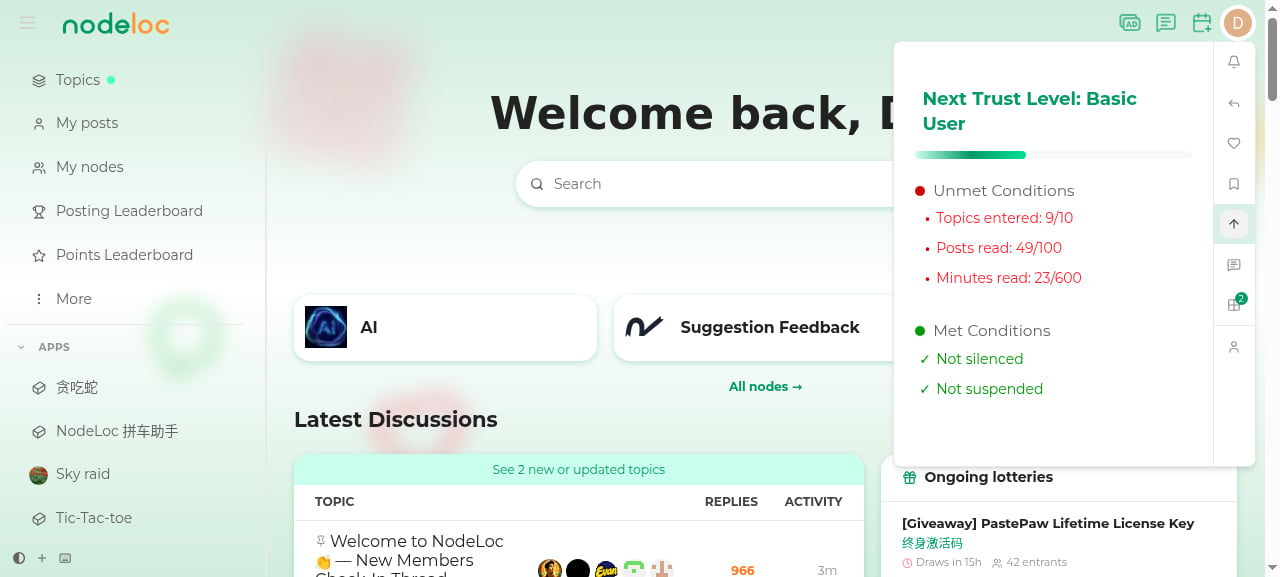
How to Check Your Promotion Progress
Click your avatar in the top-right corner to open the user menu, then select the Upgrade Progress tab (↑ arrow icon). You’ll see:- A progress bar towards the next level, with the target level name
- Unmet Conditions: what’s still missing (e.g. “Topics entered: 9/10”)
- Met Conditions: what you’ve already achieved
Permissions by Level
Messaging Permissions in Detail
Messaging Permission Tiers
-
Receive permission (available at TL0)
- Can receive personal messages and direct messages from other users
- Can reply to messages already received
-
Create permission (unlocked at TL1)
- Can initiate personal messages to other users
- Can start direct message conversations
-
Chat permission (unlocked at TL2)
- Can use real-time chat
- Can join group chats
Key Permission Milestones
-
TL0 → TL1
- Initiate private and direct messages
- Post links, embed media, upload an avatar
-
TL1 → TL2
- Real-time chat
- Custom profile background
- Invite users, ignore users
-
TL2 → TL3
- Create and manage tags
- Tag topics
-
TL3 → TL4
- Anonymous posting
- Shared drafts
Safety Mechanisms
- Anti-harassment design: TL0 users cannot initiate messages; they can only reply
- Gradual unlock: more communication permissions open up as your trust level rises
- Chat threshold: real-time chat requires TL2
Level Descriptions
- TL0 (Bronze Member): Default starting level, no special requirements
- TL1 (Silver Member): Requires basic activity
- TL2 (Gold Member): Intermediate active user, requires a certain level of community participation
- TL3 (Diamond Member): Advanced user, requires long-term, consistent, high-quality participation; all requirements must be met within the 100-day evaluation period
- TL4 (King Member): Top-tier user; in addition to meeting all Diamond requirements, candidates must pass a community approval process — the highest recognition of community contribution