
Claiming a Red Envelope
- When you see a topic with a red envelope, simply reply to the topic to claim it automatically — no other action needed.
- Each user can only claim once per red envelope.
- The amount you receive is random, and you’ll get a notification saying “Received a red envelope of N Energy”.
- Once the red envelope is fully claimed, no more shares are given out, and the top of the topic shows “The red envelope has been fully claimed!”.
Sending a Red Envelope
1
Create a new topic
Red envelopes can only be attached to new topics, so write your topic content first.
2
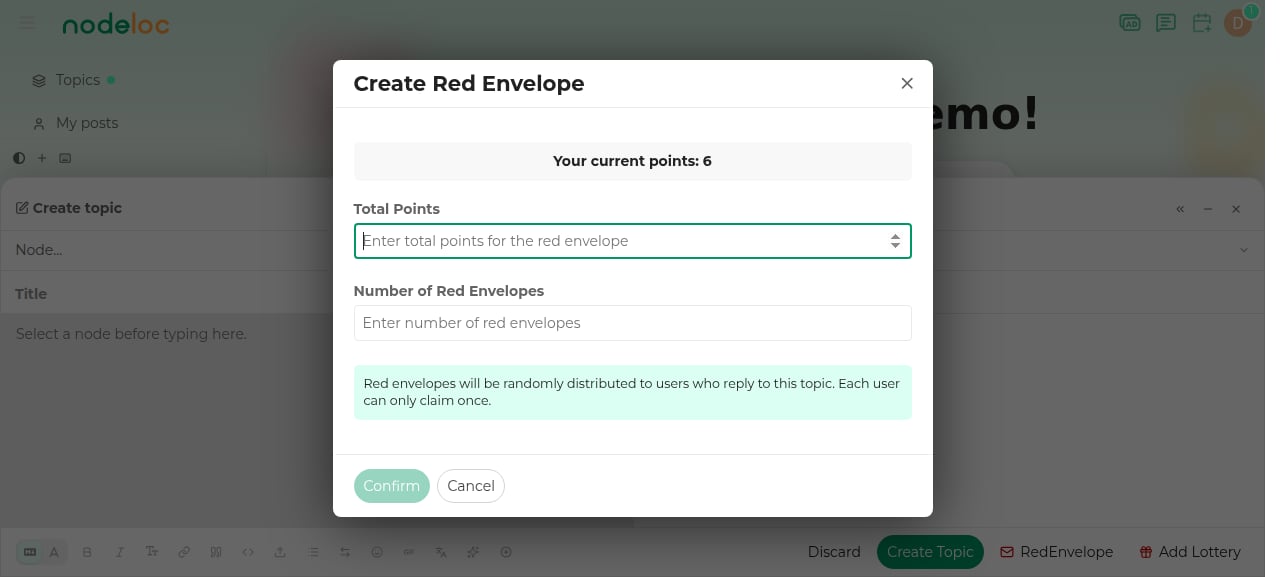
Click the red envelope button
Click the “Red Envelope” button at the bottom of the editor to open the creation window.
3
Set the amount and count
- Total Energy: the total amount of the red envelope, deducted from your account immediately upon creation
- Envelope count: the number of shares to give out
4
Publish the topic
Confirm and publish the topic; the red envelope takes effect along with it.
Rules
- When you create a red envelope, the total Energy is deducted from the host’s account immediately.
- Once a topic has replies, you can no longer attach a red envelope — set it up when publishing a new topic.
- The top of the topic shows “remaining envelopes” and “remaining Energy”, visible to everyone.
If the topic is published successfully but the red envelope fails to be created (for example, due to insufficient Energy), the topic will remain but without a red envelope. Make sure your account has enough Energy before proceeding.