
Submitting for review
- A mini app can have only one pending version at a time.
- Reviewers see the code diff, the
readme.md, the permissions you requested, and anything beyond the currently granted scope (highlighted). - Approval and authorization are two separate things: a reviewer can pass the code without expanding permissions. So only request the scopes you truly need — asking for more slows down review.
- Rejections always come with a reason, and you’ll receive a notification.
Placing into topics
Once approved, open the mini app’s detail page/apps/<slug>, paste a link to your own topic (or its topic ID), and you’re done in one click — the embed tag is written into the topic automatically, no manual copying needed.
For a mini app with
placement set to many, any member can place it into their own topics; with single, only the author and staff can place it.Installing in a node
A bot has no interface, so it is not placed in a topic — it is installed against an area. A node’s owner can install one in their own node without asking an admin: press Install on the app’s detail page, pick the node, and fill in whatever the app declared. Installing against the whole site stays an admin’s to do. After that it is managed at /apps/nodes: change its settings, or stop it. Stopping only makes it quiet — what it stored stays where it is. The settings form is built from the fields the app declared, rather than being a box to type JSON into: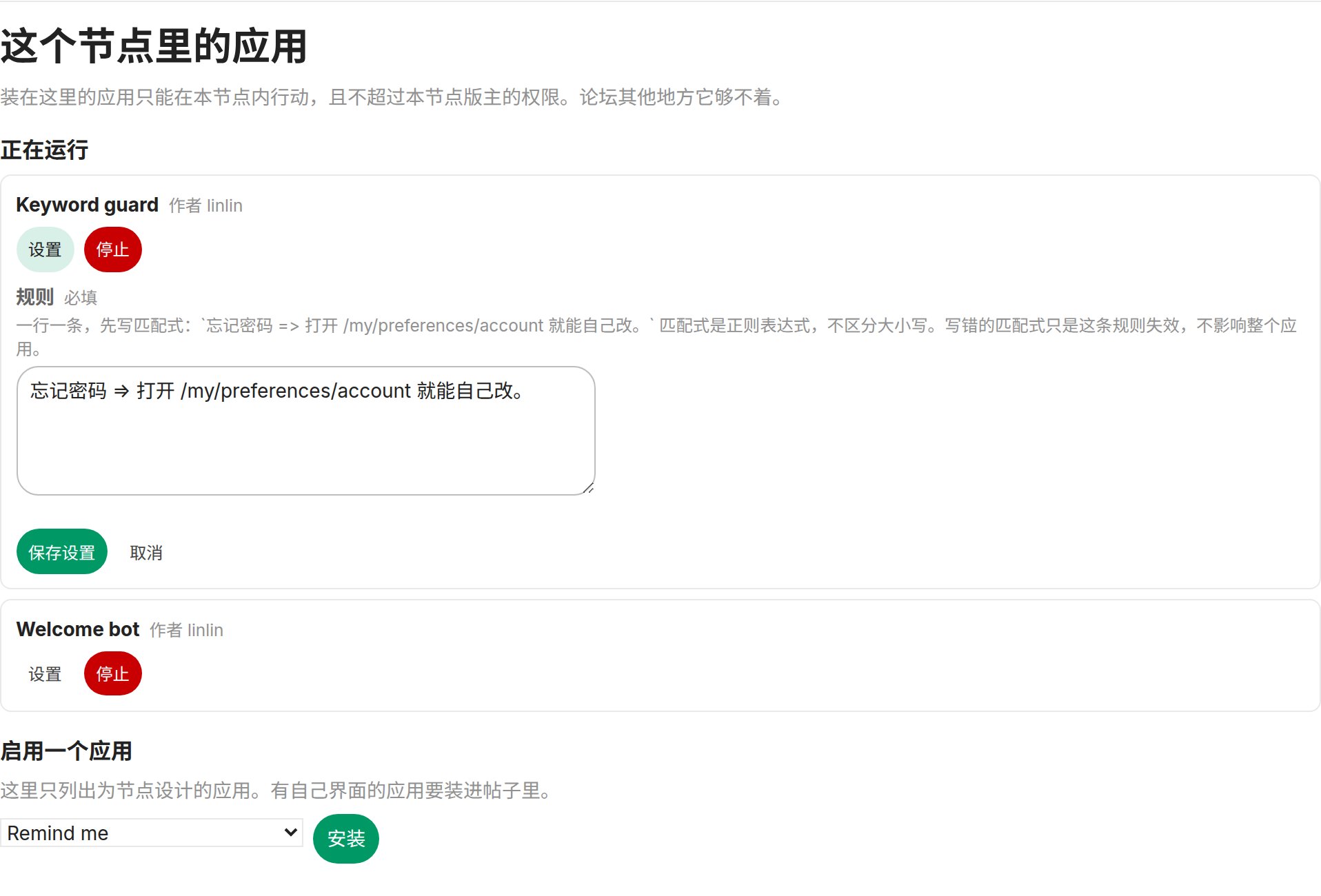
Quotas and limits
Troubleshooting
This app already has a pending version
This app already has a pending version
Wait for the review result, or ask a reviewer to reject it first.
fetch fails inside the sandbox
fetch fails inside the sandbox
The sandbox has no network access — that’s by design, and it will not change. To reach an outside service, return an
http.fetch effect: the site makes the request and the answer arrives as a separate onFetch invocation. See Bots.E_HTTP_DOMAIN_DENIED
E_HTTP_DOMAIN_DENIED
That host is not on this app’s approved list. Request it in
domains in app.json and submit again. Exact hostnames only — no wildcards, no scheme, no path.E_MOD_OUT_OF_SCOPE / E_MOD_DENIED / E_MOD_PROTECTED
E_MOD_OUT_OF_SCOPE / E_MOD_DENIED / E_MOD_PROTECTED
In order: acting outside where the app was installed; the app’s own account has no such power there; and the target is staff or one of that node’s moderators, which is always refused.
E_POST_QUOTA / E_POST_TOPIC_QUOTA
E_POST_QUOTA / E_POST_TOPIC_QUOTA
This app has spent its posts for the day, or this topic has taken its day’s bot posts — the second is counted across every app together.
The bot is installed but never does anything
The bot is installed but never does anything
A bot that only works on a schedule must export
onInstall and register its first schedule.add there, or onSchedule never fires. Also check the events line up: a topic’s first post arrives as topic_created, never as post_created.Not signed in. Run nodeloc-apps login first.
Not signed in. Run nodeloc-apps login first.
You’re not logged in, or you switched machines. Run
nodeloc-apps login.E_SCOPE_DENIED
E_SCOPE_DENIED
An effect you returned requires a scope that hasn’t been granted. Use
nodeloc-apps logs to find the invocation, then request the scope in scopes in app.json and resubmit for review.E_INVALID_BLOCKS
E_INVALID_BLOCKS
The component tree contains an unknown type or prop, or exceeds the 500 node / 32 level / 256 KB limit.
E_APP_TIMEOUT / E_APP_OUT_OF_MEMORY
E_APP_TIMEOUT / E_APP_OUT_OF_MEMORY
The sandbox killed the invocation. Handlers need to compute fast and use little memory.
window.community is undefined in the webview
window.community is undefined in the webview
The mini app hasn’t been granted the
webview permission, or the site hasn’t enabled webview support.Client reports X is not defined
Client reports X is not defined
Page JS is injected as source, not a closure, so module-level constants must be injected too. See Writing handlers.
The mini app can only be placed in one location
The mini app can only be placed in one location
Your
placement is single — which holds for nodes as well as topics. If you truly need multiple locations, change it to many, but think through the fact that the shared region will be split; use kv.app for anything that has to be shared across installs.